

Introduction
Automate manual business processes without replacing your existing software? For many SMEs, this is not only possible but often the most practical way to improve operational efficiency.
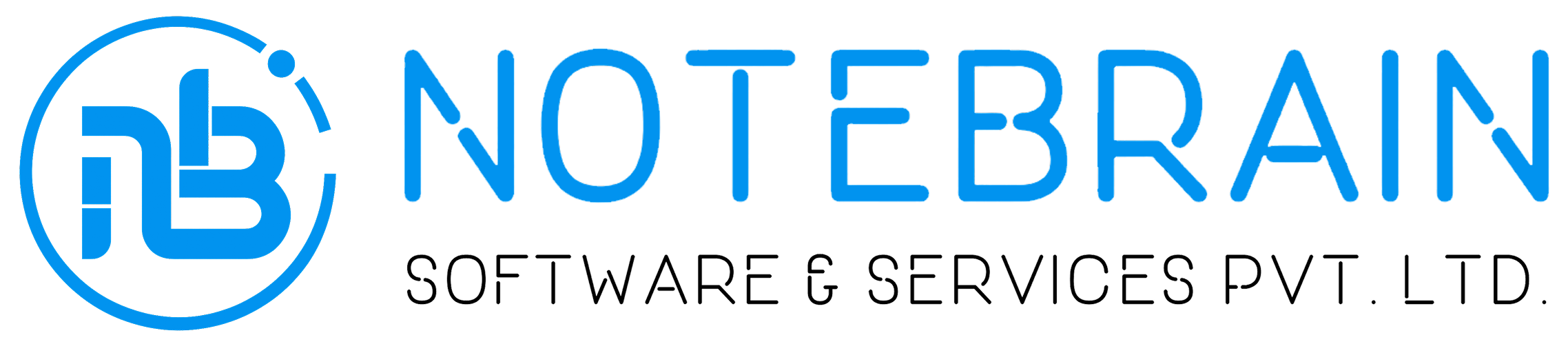
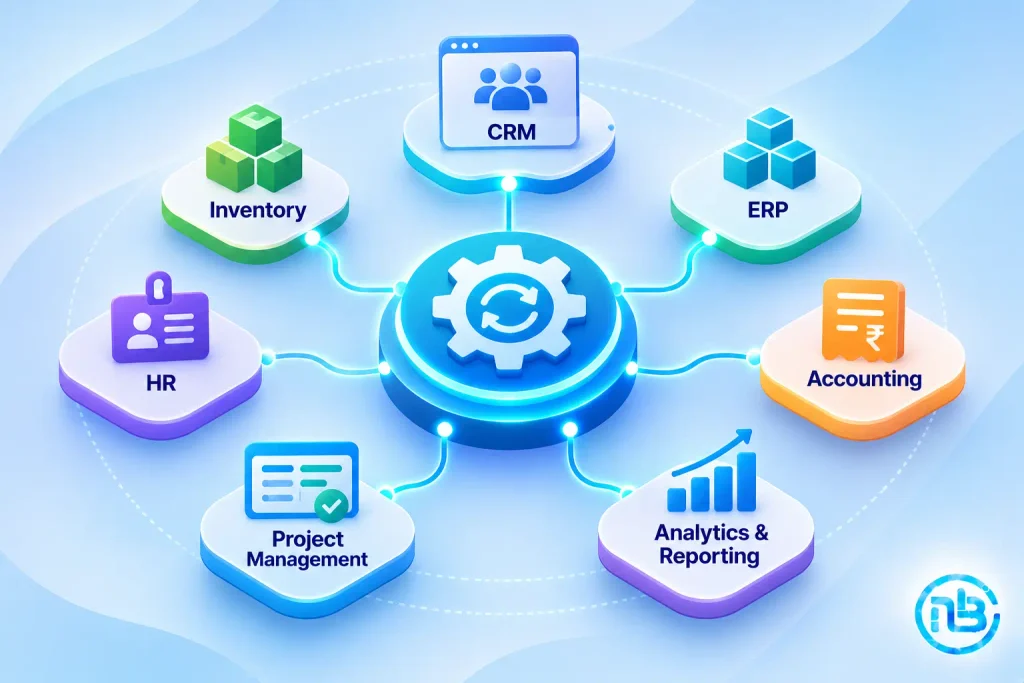
As businesses grow, their software requirements change. A company may already use a CRM for customer management, accounting software for financial operations, an ERP for inventory, and separate applications for project management or employee administration.
These systems may work perfectly well individually.
Yet employees still spend hours transferring information between applications, updating spreadsheets, sending follow-up emails, preparing reports, and coordinating tasks manually.
The immediate reaction is often to consider replacing the existing software with a new, integrated platform.
But is that really necessary?
In many situations, the problem isn’t the software itself. It’s the manual processes surrounding it and the lack of communication between different applications.
Instead of replacing everything, businesses can automate existing workflows through APIs, integrations, webhooks, and custom automation layers.
Let’s explore how.
Why Businesses Still Depend on Manual Processes
Having business software doesn’t automatically mean having automated operations.
A company might have invested in several applications but still depend on employees to move information between them.
Consider a typical sales and finance workflow:
- A customer submits an enquiry through the website.
- A salesperson manually creates a CRM record.
- Once the deal is confirmed, the sales team informs finance.
- Finance manually creates the customer record in accounting software.
- An invoice is prepared and emailed.
- Payment information is updated manually.
- Management collects information from different applications to prepare reports.
Every application performs its intended function.
However, employees are acting as the connection between these systems.
This creates several challenges:
- Repeated data entry
- Delayed communication
- Inconsistent information
- Missed follow-ups
- Increased administrative workload
- Difficulty preparing accurate reports
The solution may not require a new software platform. It may simply require connecting the systems you already have.
What Is Business Process Automation?
Business process automation involves using software, integrations, and predefined workflows to perform repetitive business activities with minimal manual intervention.
For example, instead of manually creating a customer record in multiple applications, an automated workflow can transfer the information from one system to another.
A simplified workflow might look like this:
New Customer → CRM Record → Accounting Record → Notification → Reporting Update
Once the workflow is configured, the information can move automatically whenever the required event occurs.
Automation can be implemented using:
- APIs and webhooks
- Integration platforms
- Workflow automation tools
- Custom middleware
- Scheduled background jobs
- Custom web applications
- AI-powered services
The objective is not necessarily to introduce more software.
It is to make your existing software work together more effectively.
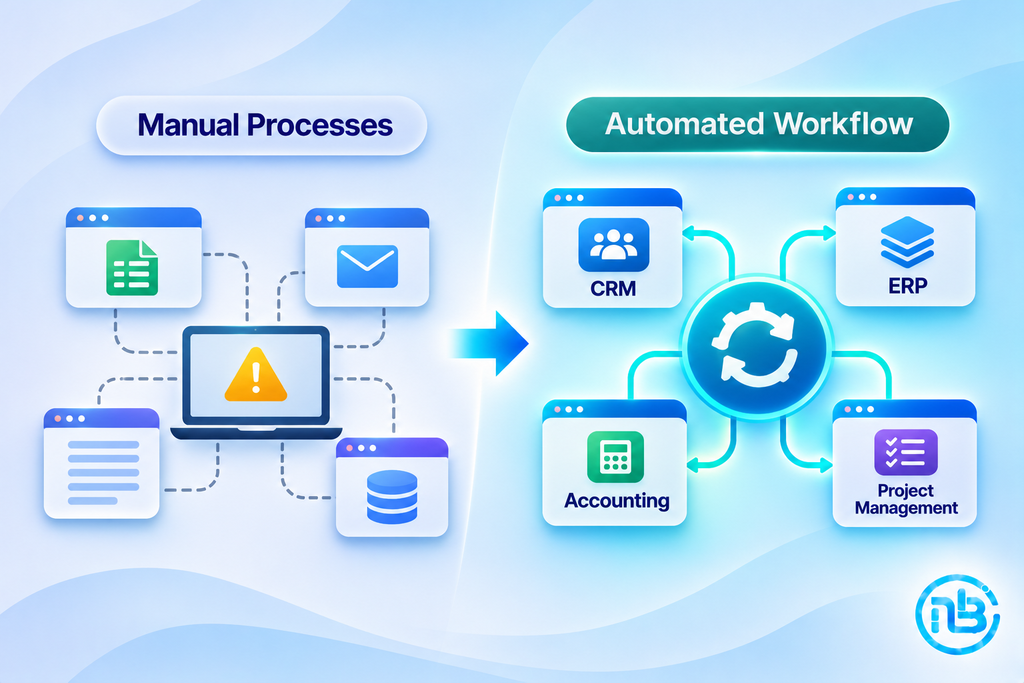
7 Manual Business Processes You Can Automate Without Replacing Existing Software
Let’s look at some practical examples.
1. Customer Data Entry and Synchronization
Customer information is often maintained across multiple applications.
For example, when a new customer registers through a website, employees may need to enter the same information into the CRM, accounting software, and internal management system.
This is repetitive and increases the possibility of errors.
What can be automated?
- Customer record creation
- Contact information synchronization
- Company information updates
- Customer status changes
- Duplicate record checks
- Internal notifications
For example, when a new customer is added to the CRM, an integration can automatically create the corresponding record in the accounting application.
Employees no longer need to enter the same information repeatedly.
2. Lead Assignment and Sales Follow-Ups
Sales teams frequently spend time assigning leads, updating opportunity statuses, and remembering follow-up dates.
These activities can often be automated without changing the existing CRM.
What can be automated?
- Lead assignment based on predefined rules
- Follow-up task creation
- Email notifications
- Inactive lead reminders
- Opportunity status updates
- Sales manager notifications
For example, when a website enquiry enters the CRM, the system can assign it to the appropriate salesperson and create a follow-up task.
The existing CRM continues managing customer information while an automation layer handles repetitive activities.
3. Invoice Generation and Payment Reminders
Finance teams often perform several repetitive activities after a sale is confirmed.
These may include creating invoices, sending them to customers, checking payment status, and following up on overdue amounts.
What can be automated?
- Invoice generation
- Invoice delivery
- Payment status synchronization
- Payment reminders
- Internal finance notifications
- Recurring invoice scheduling
For example, when a sales opportunity is marked as confirmed, the system can send the relevant information to accounting software and trigger invoice preparation.
The accounting platform remains unchanged. The workflow around it becomes more efficient.
4. Employee Onboarding and Internal Approvals
Employee onboarding often involves HR, IT, finance, and department managers.
Without structured workflows, employees may need to coordinate everything through emails and spreadsheets.
What can be automated?
- Employee record creation
- Document collection reminders
- IT account setup requests
- Department notifications
- Leave approval routing
- Expense approval workflows
- Onboarding task tracking
For example, once HR adds a new employee to the existing HR application, an automation workflow can create IT setup tasks and notify the employee’s reporting manager.
This reduces coordination effort without replacing the HR system.
5. Inventory and Purchase Management
Businesses involved in trading, manufacturing, and eCommerce often maintain inventory information across multiple applications.
When systems aren’t connected, employees may need to manually check stock levels, update spreadsheets, and communicate purchase requirements.
What can be automated?
- Stock level notifications
- Purchase request creation
- Low-inventory alerts
- Supplier notifications
- Order status updates
- Inventory synchronization
For example, when inventory falls below a predefined threshold, the system can automatically notify the purchasing team or create a purchase request.
The existing inventory application remains the primary source of stock information.
6. Reports and Management Dashboards
Management reporting is another area where manual work can consume significant time.
Employees may collect information from CRM, accounting, ERP, and project management software before preparing a consolidated report.
Instead, the required information can be collected automatically through APIs or scheduled integrations.
What can be automated?
- Sales reports
- Revenue summaries
- Outstanding payment reports
- Project status updates
- Inventory summaries
- Employee activity reports
- Management dashboards
A centralized dashboard can display relevant information without requiring employees to prepare the same reports repeatedly.
7. Customer Support and Service Notifications
Customer support teams often handle repetitive administrative activities alongside actual customer communication.
These tasks can be automated around the existing helpdesk or CRM platform.
What can be automated?
- Support ticket creation
- Ticket assignment
- Customer acknowledgement emails
- Escalation notifications
- Status updates
- Follow-up reminders
- Resolution notifications
For example, when a customer submits a support request, the system can automatically create a ticket, assign it to the appropriate team, and send an acknowledgement.
The support application continues managing tickets while automation handles the surrounding workflow.
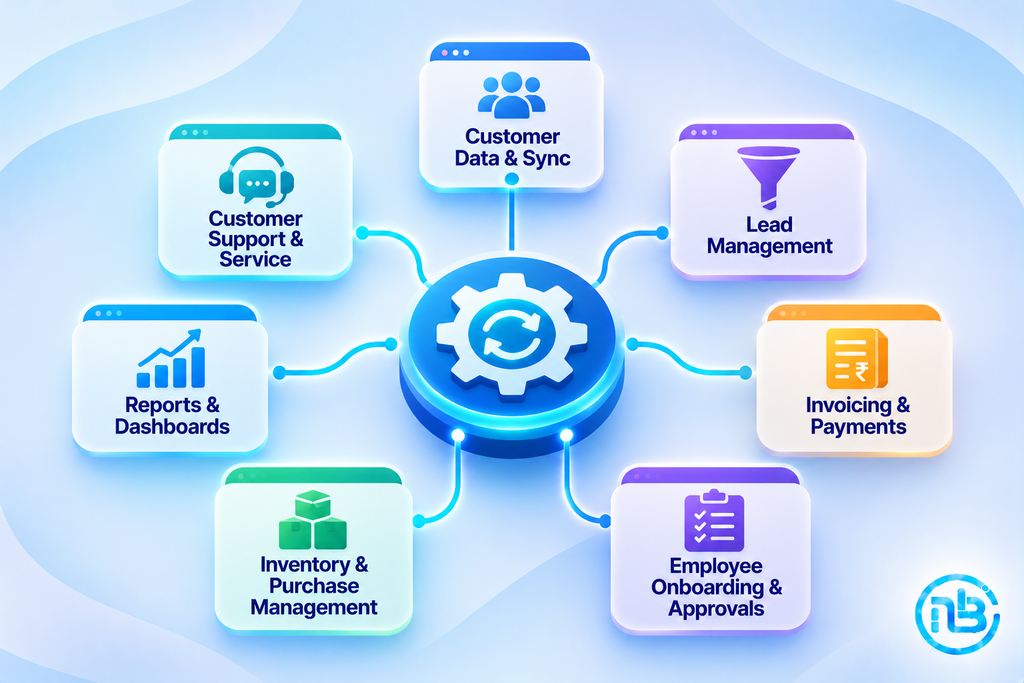
How to Connect Existing Software Without Replacing It
The most important part of this approach is understanding how different applications can communicate.
There are several ways to achieve this.
1. API Integration
An API allows different software applications to exchange information through defined endpoints.
For example, your CRM may provide an API that allows another application to retrieve customer details or create new records.
An integration can use these capabilities to transfer information automatically.
A typical example:
CRM API → Integration Service → Accounting Software API
When a sales opportunity is confirmed, the integration service can retrieve the relevant information and send it to the accounting platform.
APIs are particularly useful when both applications support the required operations.
2. Webhooks
A webhook allows one application to notify another when a specific event occurs.
Instead of repeatedly checking whether something has changed, the receiving application gets notified when the event happens.
For example:
- A new lead is created.
- An invoice is marked as paid.
- An order is confirmed.
- A support ticket changes status.
The receiving system can then initiate the next step in the workflow.
Webhooks are especially useful for event-driven automation.
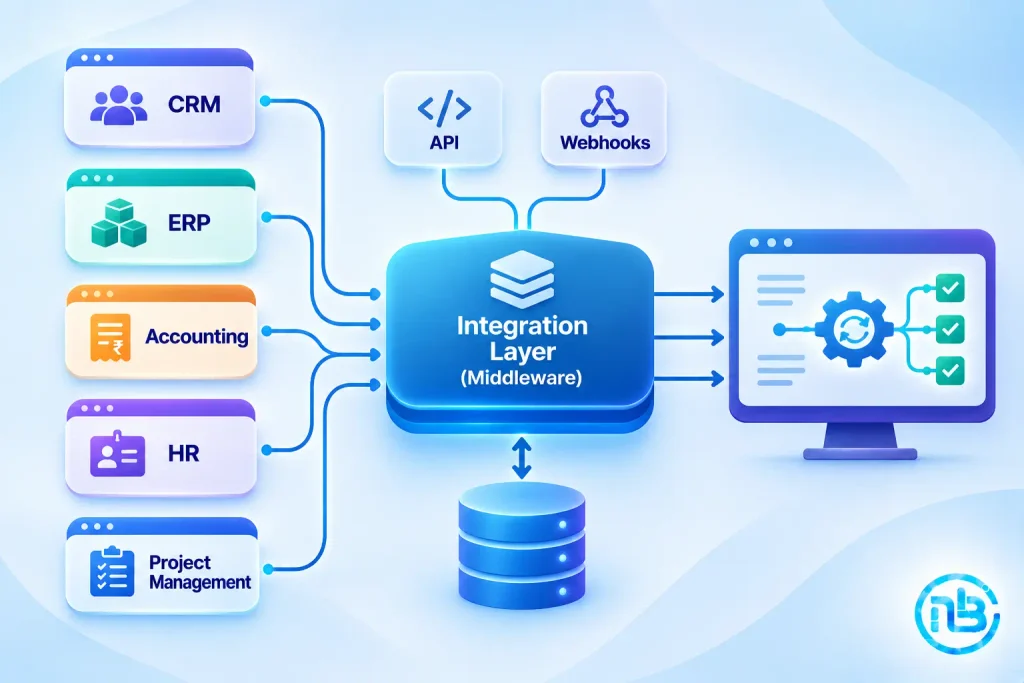
3. Middleware and Integration Layers
Sometimes applications cannot communicate directly in the way your business requires.
This is where middleware becomes useful.
Middleware acts as an intermediate layer between different systems.
For example:
CRM → Middleware → ERP → Accounting
It can handle:
- Data transformation
- Field mapping
- Authentication
- Business rules
- Error handling
- Data validation
- Communication between applications
This approach is particularly useful when multiple systems need to exchange information.
It also prevents every application from requiring separate, complicated integration logic with every other application.
4. Workflow Automation Platforms
Some business processes can be automated using existing workflow automation platforms.
These tools allow businesses to connect supported applications and define actions based on specific triggers.
For example:
New Form Submission → Create CRM Lead → Send Email → Notify Sales Team
They can be useful when workflows are relatively straightforward and supported connectors are available.
However, complex business rules, specialized integrations, and advanced permissions may require custom development.
5. Custom Automation Applications
Sometimes, existing automation tools cannot accommodate the exact workflow a business requires.
In such situations, a custom automation application can act as a bridge between existing software systems.
It can provide:
- Centralized workflow management
- Custom business rules
- Approval interfaces
- Integration monitoring
- User permissions
- Exception handling
- Custom reporting
This is useful when a business needs more control without replacing its existing applications.
What If Your Existing Software Doesn’t Have an API?
Not every business application provides modern integration capabilities.
Some older systems have limited APIs or no direct integration support.
That doesn’t automatically mean you need to replace them.
Depending on the application, alternatives may include:
- Database-level integration, where supported and safe
- Scheduled CSV or Excel imports and exports
- Secure file-based data exchange
- Email-based automation
- Supported application connectors
- Robotic process automation (RPA)
Each approach has limitations.
For example, direct database integration should only be considered when the software vendor supports it and the data structure is properly understood.
Similarly, RPA can automate repetitive actions through an application’s interface, but it may be more fragile than an API-based integration.
The right approach depends on the existing system’s capabilities, security requirements, and the importance of the workflow.
A Practical Example: Automating a Complete Sales-to-Finance Workflow
Let’s consider a growing SME that already uses:
- A website for lead generation
- A CRM for sales management
- Accounting software for invoices
- Project management software for delivery
The company doesn’t want to replace any of these applications.
However, its employees spend considerable time transferring information between them.
A custom integration workflow could work like this:
Step 1: Lead Generation
A customer submits an enquiry through the website.
Step 2: CRM Entry
The lead is automatically created in the existing CRM.
Step 3: Sales Confirmation
Once the salesperson marks the opportunity as won, the automation workflow is triggered.
Step 4: Accounting Synchronization
Relevant customer and commercial information is transferred to the accounting application.
Step 5: Project Creation
A project is automatically created in the project management system using the approved information.
Step 6: Internal Notifications
The finance and delivery teams receive notifications about the new business.
Step 7: Management Reporting
The relevant information becomes available for consolidated reporting.
The important point is that none of the existing applications needs to be replaced.
The integration connects them into a more efficient business workflow.
How to Choose the Right Automation Approach
Not every workflow requires custom development.
The right solution depends on the complexity of the process and the capabilities of your existing applications.
| Requirement | Suitable Approach |
|---|---|
| Simple application-to-application workflow | Workflow automation platform |
| Applications with compatible APIs | API integration |
| Event-based notifications | Webhooks |
| Multiple systems with complex business rules | Middleware |
| Specialized approval and operational workflows | Custom automation application |
| Legacy application without API support | Supported file exchange or RPA |
In many cases, a combination of these approaches provides the best result.
Common Mistakes to Avoid When Automating Existing Systems
Automation can improve efficiency, but poor implementation can create additional operational problems.
Here are some mistakes businesses should avoid.
Automating a Poorly Defined Process
If the existing workflow is confusing, automating it may simply make the confusion happen faster.
Review and simplify the process before introducing automation.
Ignoring Data Quality
If different applications contain inconsistent customer records, incorrect information may be transferred automatically.
Establish data validation and duplicate-checking rules.
Creating Too Many Independent Integrations
Connecting every application directly to every other application can become difficult to maintain.
For complex environments, a centralized integration layer may provide better control.
Ignoring Failed Transactions
An integration can fail because of authentication issues, unavailable services, incorrect data, or API limits.
A reliable automation system should include logging, error notifications, retry mechanisms, and a way to identify transactions that need manual attention.
Overlooking Security
Integrations often exchange customer, financial, and operational information.
Use appropriate authentication, access controls, encryption, and audit logging.
Only transfer the information required for the workflow.
Automating Everything at Once
Trying to automate every department simultaneously can increase implementation risk.
Start with one high-value process, measure the results, and expand gradually.
How to Start Automating Without Replacing Your Existing Software
You don’t need a large digital transformation project to begin.
A structured approach can help you achieve meaningful improvements.
Step 1: Identify Manual Activities
Talk to employees and identify tasks involving repetitive data entry, approvals, notifications, reporting, and information transfer.
Step 2: Map the Existing Workflow
Document how information currently moves between employees, departments, and applications.
Step 3: Identify the Bottlenecks
Find the steps responsible for delays, errors, duplicated work, or unnecessary administrative effort.
Step 4: Check Existing Software Capabilities
Review available APIs, webhooks, connectors, export options, and integration documentation.
Step 5: Select One High-Value Process
Choose a workflow that is relatively straightforward but offers measurable business benefits.
Step 6: Build and Test the Automation
Implement the integration, test normal and exceptional situations, and verify that information is transferred correctly.
Step 7: Measure the Results
Track time saved, manual activities reduced, errors prevented, and improvements in turnaround time.
Step 8: Expand Gradually
Once the first automation is stable, move to other workflows and departments.
Where AI Fits Into Business Process Automation
AI can extend traditional automation, particularly when a workflow involves unstructured information or requires interpretation.
For example:
- Extracting information from invoices
- Categorizing customer enquiries
- Summarizing email conversations
- Classifying support tickets
- Identifying unusual transactions
- Generating management summaries
- Suggesting follow-up actions
However, AI isn’t necessary for every automation task.
If a process follows clear rules, traditional automation is often simpler, more predictable, and easier to maintain.
A practical strategy is to use rules-based automation for routine operations and introduce AI where intelligent interpretation provides genuine value.
Frequently Asked Questions
Yes. Existing software can often be connected through APIs, webhooks, middleware, workflow automation platforms, and custom integrations. This allows businesses to automate repetitive activities while continuing to use their current applications.
The required technology depends on the workflow. Simple processes may need only an automation platform, while complex workflows may require APIs, middleware, custom applications, or RPA.
Alternative options may include supported file imports and exports, scheduled data exchange, secure database integration where supported, or robotic process automation. The feasibility depends on the application and its technical limitations.
No. Many processes can be automated using existing integration and workflow tools. Custom software becomes useful when workflows involve specialized business rules, complex approvals, multiple systems, or requirements that existing platforms cannot handle.
Not necessarily. The cost depends on the number of systems involved, integration complexity, workflow requirements, and maintenance needs. Starting with a single high-value process can keep the initial investment manageable.
No. Traditional automation is suitable for predictable, rule-based activities. AI is more useful when a process involves interpreting documents, classifying information, summarizing content, or making recommendations.
Conclusion
Replacing existing software isn’t always the answer to improving business efficiency.
Many SMEs already have applications that perform their individual functions well. Their real challenge is the manual work required to connect those applications and coordinate activities between departments.
By using APIs, webhooks, middleware, workflow automation, and custom integrations, businesses can eliminate repetitive tasks while protecting their existing software investments.
The best approach is to understand your current processes, identify the biggest bottlenecks, and automate them one at a time.
You may discover that your business doesn’t need an entirely new software platform. It simply needs its existing systems to communicate and work together.
At Notebrains, we help businesses connect their existing applications, automate manual workflows, and develop custom integration solutions around their operational requirements.
Whether you need CRM-to-ERP integration, automated financial workflows, custom middleware, or a centralized business automation application, the objective is to make your existing technology work harder for your business.
You don’t always need to replace the systems you use. Sometimes, you just need to connect them better.