
Introduction
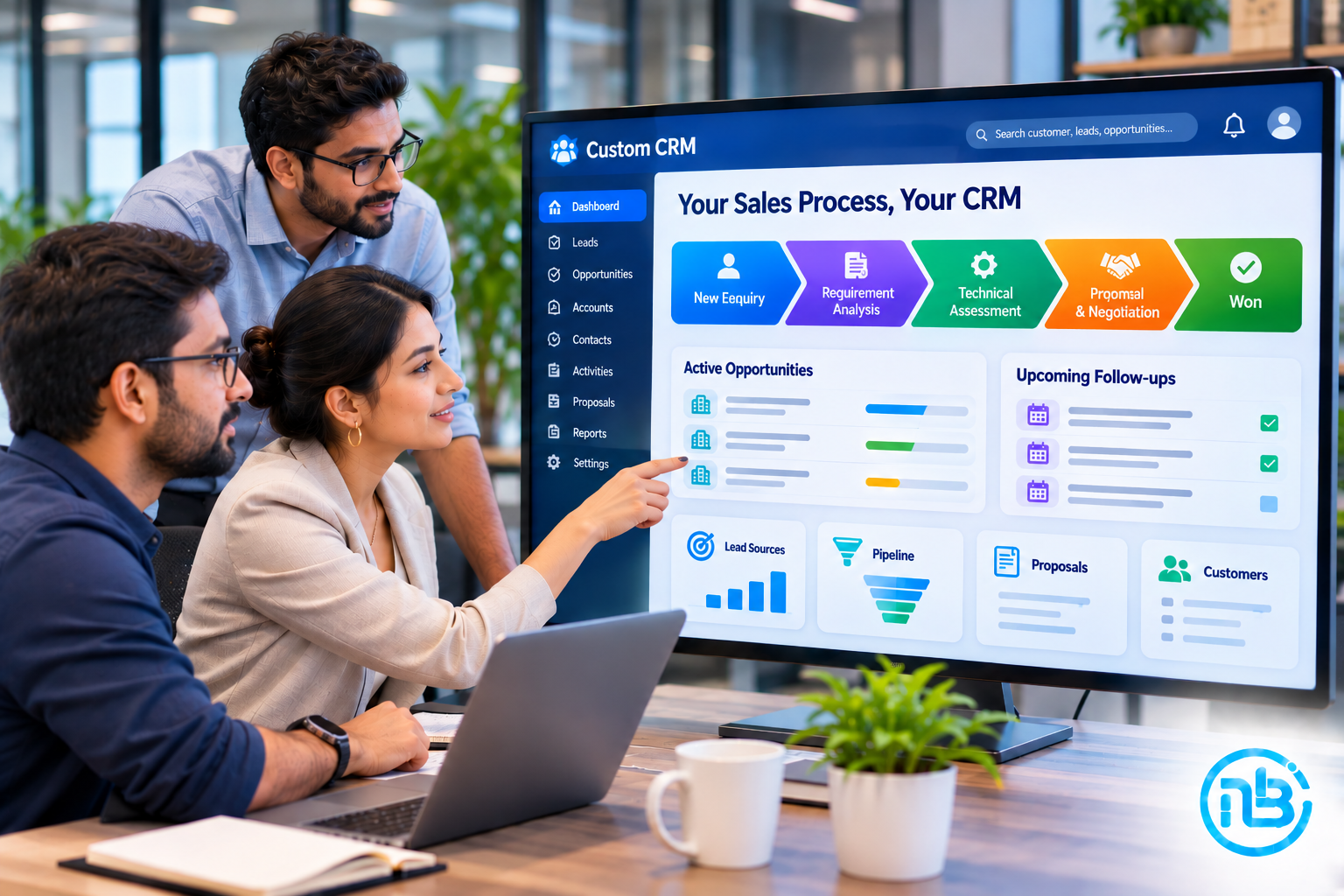
Custom CRM development gives businesses the flexibility to build a customer relationship management system around the way their sales teams actually work.
Most businesses don’t have exactly the same sales process.
A software development company may manage enquiries, requirement discussions, technical assessments, proposals, negotiations, and project handovers. An eCommerce business may focus on customer acquisition, repeat purchases, and retention. A B2B company may have multiple decision-makers, lengthy sales cycles, and several approval stages.
Yet many businesses try to manage all these different processes using the same generic CRM structure.
Initially, it may seem convenient. But as the business grows, employees often find themselves working around the limitations of the software.
They maintain separate spreadsheets, create additional fields, use external tools, and sometimes ignore parts of the CRM altogether.
The problem isn’t necessarily the sales team.
The problem may be that the CRM doesn’t reflect how the business operates.
Instead of changing your business to fit a CRM, you can build a system that follows your actual sales process.
Let’s explore how.
Why Generic CRM Software Doesn’t Always Fit Every Business
Popular CRM platforms offer a wide range of features, integrations, and automation capabilities. For many businesses, they provide everything needed to manage customers and sales opportunities.
However, a standard CRM may not accommodate every business requirement without customization.
Consider a company that follows this sales process:
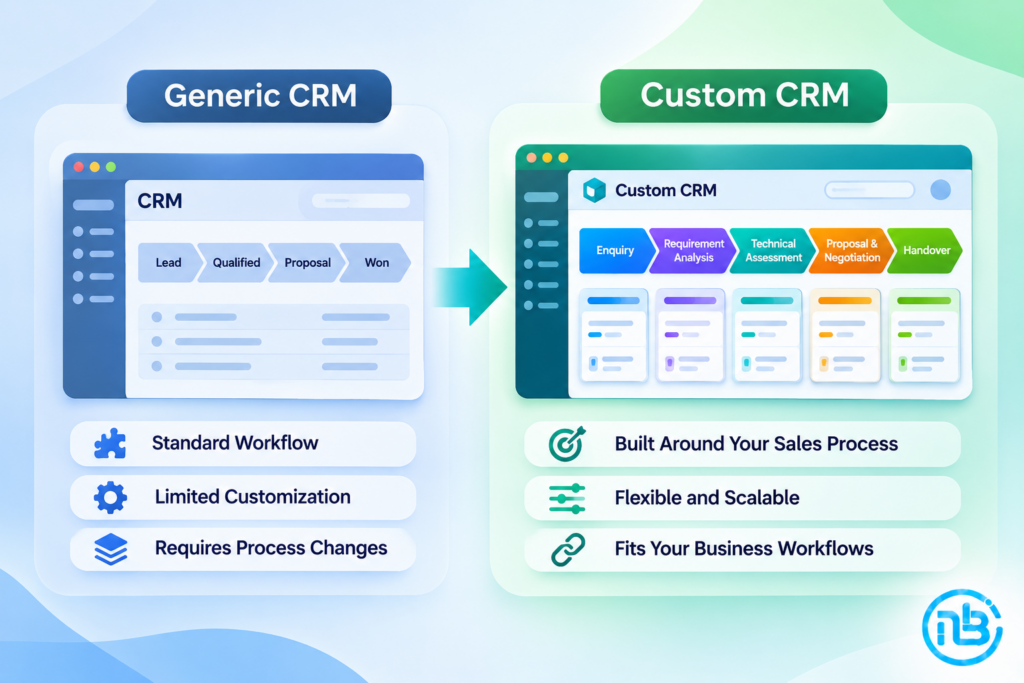
New Enquiry → Initial Discussion → Requirement Analysis → Technical Assessment → Proposal → Negotiation → Confirmation → Project Handover
A generic CRM might provide standard stages such as:
New → Contacted → Qualified → Proposal → Won/Lost
Although these stages look similar, they may not capture the actual activities and responsibilities involved in the company’s sales process.
The business may need:
- Technical assessment records
- Requirement documentation
- Multiple proposal versions
- Internal approval workflows
- Custom quotation calculations
- Department-specific responsibilities
- Project handover checklists
If the CRM cannot accommodate these requirements conveniently, employees may start managing important information outside the system.
Over time, this creates disconnected data and reduces the CRM’s usefulness.
When Should You Consider Custom CRM Development?
Building a custom CRM isn’t automatically better than purchasing an existing platform.
A standard CRM may be perfectly suitable if your sales process follows conventional workflows.
However, custom development becomes worth considering when your requirements are more specific.
1. Your Sales Process Is Unique
Your business may have multiple qualification stages, technical reviews, approval processes, or customer-specific workflows.
If the CRM forces you to simplify or change these processes unnecessarily, customization may be a better option.
2. Your Team Relies on Spreadsheets Alongside the CRM
If employees regularly export CRM information into spreadsheets to perform essential activities, your CRM may not be addressing all their operational needs.
A custom CRM can bring these activities into one structured environment.
3. You Need Specific Business Rules
For example:
- Certain leads must be approved before assignment.
- Specific discounts require management approval.
- Different sales teams follow different pipelines.
- Some opportunities require technical assessment.
- Certain customers need specialized follow-up workflows.
These requirements can be implemented as application logic.
4. Your CRM Needs to Connect With Other Business Systems
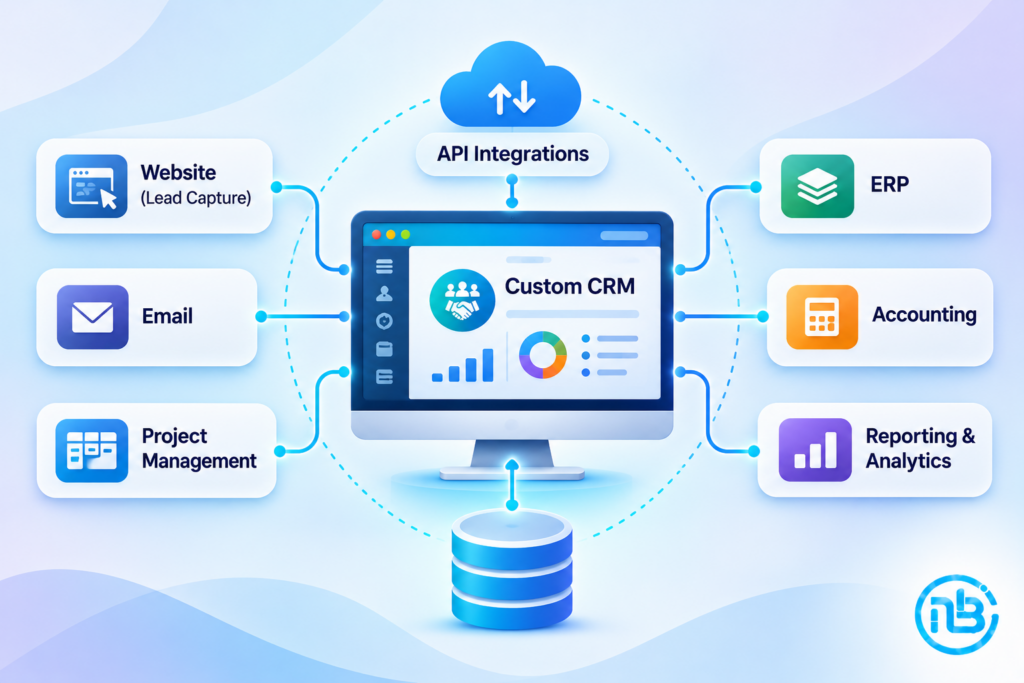
Your sales process may depend on accounting software, ERP, project management tools, inventory systems, or custom applications.
If the existing CRM cannot integrate with these systems in the way you need, custom development can provide more flexibility.
5. You Need Better Control Over Your Data and Workflows
Some businesses require specific permissions, reporting structures, data relationships, or operational controls.
A custom CRM allows these requirements to be designed into the application.
Start by Understanding Your Existing Sales Process
The most important part of custom CRM development happens before coding begins.
You need to understand how your sales process works today.
Don’t start by listing features you want in the CRM.
Start by documenting the journey of a customer from the first interaction to the final sale.
For example:
A Typical B2B Sales Journey
Lead Generation
A potential customer submits an enquiry through the website, email, referral, or another channel.
Lead Qualification
The sales team checks the customer’s requirements, budget, industry, and suitability.
Requirement Discussion
The salesperson gathers information about the customer’s expectations.
Proposal Preparation
A quotation or proposal is prepared and shared.
Negotiation
The customer discusses pricing, scope, and commercial terms.
Deal Confirmation
The opportunity is converted into a confirmed customer or project.
Handover
The relevant information is transferred to the delivery or operations team.
This journey should become the foundation of your CRM design.
Design Your CRM Around Your Sales Pipeline
A sales pipeline is one of the most important components of a CRM.
However, your pipeline should represent your actual sales stages rather than simply using a predefined structure.
For example, a software development company might need the following stages:
| Sales Stage | Purpose |
|---|---|
| New Enquiry | Capture incoming leads |
| Initial Contact | Establish communication |
| Requirement Gathering | Understand project requirements |
| Technical Evaluation | Assess feasibility |
| Proposal Sent | Share commercial proposal |
| Negotiation | Discuss scope and pricing |
| Won | Confirm the opportunity |
| Lost | Record unsuccessful opportunities |
A custom CRM can also support different pipelines for different business units.
For example, your website development team and enterprise software team may follow different sales journeys.
Each pipeline can have its own stages, required fields, permissions, and automation rules.
This makes the system more relevant to the people using it.
Identify the Information Your Sales Team Actually Needs
Not every business needs the same CRM fields.
A generic CRM may ask for information that is irrelevant to your business while missing information that is essential.
A custom CRM allows you to define fields around your sales requirements.
For example, a software development company might need:
Customer Information
- Company name
- Contact person
- Email address
- Phone number
- Industry
- Company website
Opportunity Information
- Service required
- Project type
- Estimated budget
- Expected timeline
- Lead source
- Opportunity value
- Probability of conversion
Requirement Information
- Project description
- Technical requirements
- Reference websites
- Required integrations
- Supporting documents
Commercial Information
- Proposal value
- Discount
- Payment terms
- Proposal status
- Approval status
The objective is to capture useful information without making data entry unnecessarily complicated.
A good CRM should ask employees for the information they need at the appropriate stage of the sales process.
Build Features Around Your Sales Workflow
Once the pipeline and data requirements are clear, you can define the core CRM modules.
Here are some important features to consider.
1. Lead Management
The lead management module should capture enquiries from different sources.
Potential integrations include:
- Website enquiry forms
- Landing pages
- Social media
- Referral systems
- External lead generation platforms
Leads can be automatically assigned to sales representatives based on predefined rules.
2. Contact and Company Management
A CRM should maintain structured customer information.
Instead of storing every interaction separately, the system should connect contacts with their respective companies and opportunities.
This gives sales teams a complete view of customer relationships.
3. Opportunity Management
Each opportunity should have its own:
- Sales stage
- Estimated value
- Expected closing date
- Assigned salesperson
- Requirements
- Activities
- Documents
- Communication history
This makes it easier to understand the progress of every potential deal.
4. Follow-Up and Activity Management
Sales opportunities often get delayed because follow-ups are missed.
Your CRM can include:
- Follow-up scheduling
- Task assignment
- Email reminders
- Call records
- Meeting notes
- Activity history
- Overdue follow-up alerts
This ensures that important opportunities don’t disappear simply because someone forgot to follow up.
5. Proposal and Quotation Management
For businesses that regularly prepare proposals, quotations, or estimates, this can become an important CRM module.
The system can allow sales teams to:
- Create proposals
- Add products or services
- Configure pricing
- Apply discounts
- Generate documents
- Track proposal versions
- Record customer responses
You can also introduce approval workflows for discounts or special commercial terms.
6. Sales Reporting and Dashboards
Management should be able to understand sales performance without manually collecting information from employees.
Useful reports may include:
- Lead sources
- Pipeline value
- Conversion rates
- Salesperson performance
- Lost opportunities
- Average sales cycle
- Expected revenue
- Follow-up performance
Because the CRM follows your business process, reports can reflect the metrics that actually matter to your company.
Automate Your Sales Process Without Losing Control
Automation can make a custom CRM significantly more useful.
However, automation should support your sales process rather than introduce unnecessary complexity.
Consider a few examples.
Automatic Lead Assignment
When a new lead arrives, the CRM assigns it to the appropriate salesperson based on territory, service category, workload, or other rules.
Follow-Up Reminders
If a salesperson hasn’t contacted a qualified lead within the defined period, the system generates a reminder.
Proposal Approval
When a salesperson submits a proposal containing a discount beyond the permitted limit, the CRM automatically sends it to a manager for approval.
Opportunity Stage Updates
When a proposal is approved, the CRM can update the opportunity stage and notify the relevant salesperson.
Project Handover
Once a deal is marked as won, the CRM can generate a handover task and share the relevant customer and project information with the delivery team.
These small automations can remove repetitive administrative work and improve consistency.
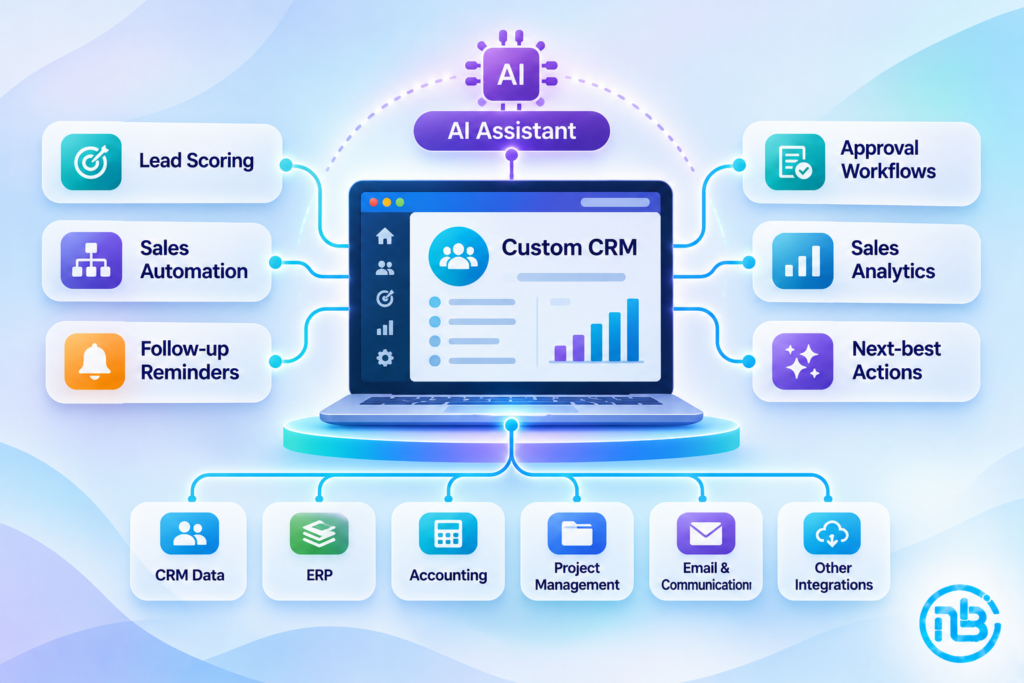
Connect Your CRM With the Rest of Your Business Software
A CRM shouldn’t become another isolated application.
Your sales process often interacts with several other departments and platforms.
A well-designed custom CRM can integrate with:
| System | Possible Integration |
|---|---|
| Accounting | Invoice and payment information |
| ERP | Orders, inventory, and operational data |
| Project Management | Project creation and handover |
| Customer communication | |
| Website | Lead capture |
| Payment Gateway | Payment status |
| Reporting Tools | Business analytics |
For example, when an opportunity is marked as won, the CRM could automatically create a project in your project management system.
Customer details and approved commercial information can be transferred without employees entering everything again.
This is where APIs, webhooks, and integration architecture become important.
Design Different Roles and Permissions
Not everyone in your company should have access to every CRM feature.
A custom CRM should support permissions based on employee responsibilities.
For example:
Sales Representative
Can manage assigned leads, update opportunities, record activities, and prepare proposals.
Sales Manager
Can view team performance, assign leads, approve discounts, and review sales pipelines.
Administrator
Can manage users, permissions, configurations, and system settings.
Finance Team
Can access relevant commercial information, invoices, and payment records.
Management
Can view consolidated reports and business performance.
Role-based access control helps protect sensitive information while keeping the application organized.
Don’t Build Every CRM Feature at Once
A common mistake is trying to build a complete CRM with every possible feature from the beginning.
This can increase development costs, extend the timeline, and make the system difficult to validate.
A better approach is to start with an MVP.
Phase One: Core CRM
- Login and user management
- Lead management
- Contact management
- Custom sales pipeline
- Opportunity tracking
- Follow-up activities
- Basic dashboards
Phase Two: Sales Automation
- Automatic lead assignment
- Follow-up reminders
- Proposal management
- Approval workflows
- Email notifications
- Advanced reporting
Phase Three: Business Integration
- Accounting integration
- ERP integration
- Project management integration
- Website lead synchronization
- Advanced analytics
Phase Four: Intelligent CRM
- AI-assisted lead qualification
- Customer interaction summaries
- Sales forecasting
- Follow-up recommendations
- Natural language reporting
This phased approach allows your team to start using the CRM early and improve it based on real feedback.
What Technology Should You Use to Build a Custom CRM?
The technology stack should depend on the CRM’s requirements, expected usage, integrations, and future expansion plans.
A typical modern custom CRM may use:
Frontend: React.js or Next.js for interactive dashboards, forms, and sales pipeline interfaces.
Backend: Node.js with Express.js, Laravel, or Python with FastAPI for application logic and APIs.
Database: PostgreSQL or MySQL for storing structured customer, lead, opportunity, and activity information.
Authentication: Secure login, session management, and role-based access control.
Integrations: REST APIs and webhooks for connecting external business applications.
Infrastructure: Cloud hosting with appropriate backups, monitoring, security, and deployment processes.
The important thing is not selecting the most fashionable technology.
It’s choosing an architecture that supports your sales process today and can grow with your business.
Common Mistakes to Avoid When Building a Custom CRM
Copying a Generic CRM Design
If you’re investing in custom development, don’t simply recreate another CRM without understanding your own sales requirements.
Adding Too Many Fields
Collecting unnecessary information makes the CRM harder to use.
Capture information that supports actual business decisions and workflows.
Ignoring Employee Feedback
The people using the CRM every day should participate in its design and testing.
A system that looks good to management but frustrates sales representatives will struggle with adoption.
Overcomplicating Automation
Automating every small activity can create unnecessary notifications and confusing workflows.
Automate where it genuinely saves time or improves consistency.
Ignoring Reporting Requirements
Define the reports management needs before finalizing your data structure.
Otherwise, you may need expensive changes later.
Forgetting Future Integrations
Even if you don’t need accounting or ERP integration immediately, consider how the CRM will connect with these systems in the future.
How to Know Whether Custom CRM Development Is Worth the Investment
Building a custom CRM requires an initial investment in planning, development, testing, and maintenance.
It makes sense when the long-term business value justifies that investment.
Consider custom development if:
- Your sales process is significantly different from standard CRM workflows.
- Existing platforms require extensive workarounds.
- Your team maintains important information outside the CRM.
- You need specialized approval and quotation processes.
- Your CRM must integrate deeply with internal applications.
- You need complete control over the data structure and business logic.
- Existing CRM licensing or customization costs are becoming difficult to justify.
However, if your requirements are straightforward, an existing CRM may still be the more economical choice.
The objective is not to build custom software simply because you can.
It is to choose the solution that best supports your business.
Frequently Asked Questions
Custom CRM development involves building a customer relationship management application specifically around a company’s sales process, customer management requirements, business rules, reporting needs, and integrations.
A custom CRM can be useful when standard platforms cannot accommodate specific sales stages, approval workflows, business rules, integrations, or reporting requirements. However, an existing CRM is often more suitable for businesses with standard requirements.
Yes. A custom CRM can integrate with accounting, ERP, project management, email, payment, and other business applications through APIs, webhooks, or integration services, depending on the capabilities of those systems.
The development timeline depends on the number of modules, workflow complexity, integrations, user roles, security requirements, and reporting features. Starting with a focused MVP can help deliver the core CRM functionality sooner.
Yes. A custom CRM can support different pipelines for different departments, services, products, or business units. Each pipeline can have its own stages, rules, permissions, and reporting structure.
Yes. AI can support lead scoring, customer segmentation, sales forecasting, interaction summaries, follow-up recommendations, and intelligent reporting. These features can be introduced gradually based on actual business requirements.
Conclusion
A CRM should make your sales process easier to manage, not force your team to change the way they work.
While standard CRM platforms provide excellent functionality for many businesses, they may not always accommodate specialized workflows, approval requirements, integrations, and reporting structures.
Custom CRM development provides an opportunity to build a system around the actual way your business generates leads, manages customers, handles opportunities, and closes deals.
Start by documenting your sales process.
Identify the information your team needs.
Define the pipeline, responsibilities, and approval rules.
Build the essential features first, and expand gradually as your requirements evolve.
At Notebrains, we develop custom business applications designed around real operational requirements. Whether you need a CRM built around a specialized sales pipeline, advanced approval workflows, integrations with existing software, or an intelligent customer management platform, the objective is to build technology that supports how your business actually operates.
Your CRM should work for your business. Your business shouldn’t have to work around your CRM.