
Introduction
Every growing business develops its own way of doing things.
A sales team may maintain leads in spreadsheets. The operations team may receive requests through email or WhatsApp. Managers may approve tasks manually. Finance may maintain another spreadsheet for billing. Someone may even have a master Excel file that the entire business depends on.
It may work when the business is small. But as the number of employees, customers, transactions, and processes increases, these manual workflows can become difficult to manage.
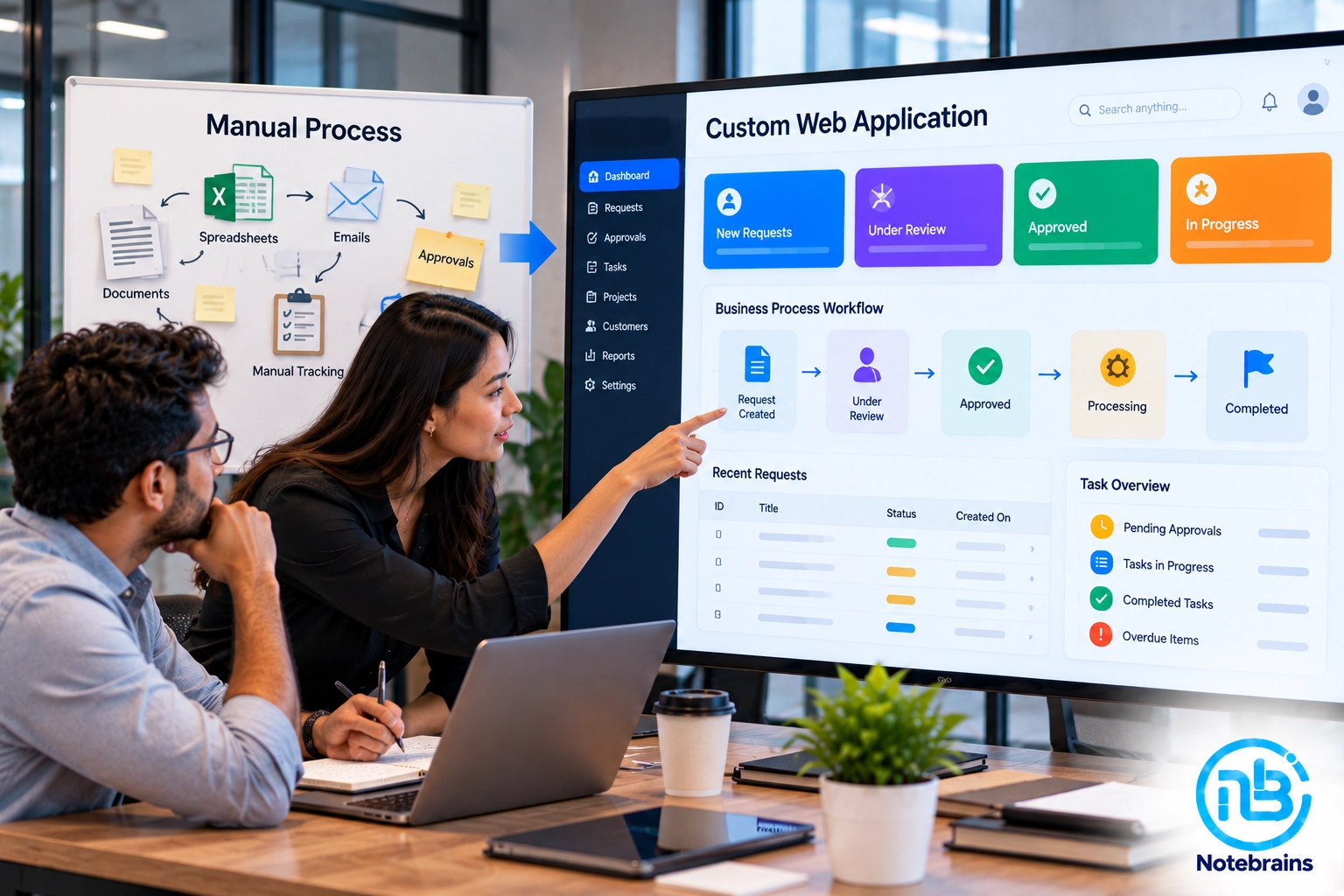
This is where a custom web application can make a significant difference. Instead of asking employees to work around disconnected tools, you can turn the actual business process into software that follows the way your company operates.
The goal isn’t simply to “build an app.” The goal is to turn a business process into a structured, repeatable, measurable digital workflow.
What Is a Custom Web Application?
A custom web application is software developed specifically around the requirements of a particular business or workflow.
Unlike a generic SaaS product, it doesn’t force your business to change its processes simply to fit the software.
A custom application can be designed around:
- Your business rules
- Your approval process
- Your user roles
- Your data
- Your workflows
- Your reporting requirements
- Your integrations
- Your existing software
For example, a company might have an internal process like:
Customer Request → Employee Review → Manager Approval → Operations → Finance → Completion
Instead of managing this through emails, spreadsheets, and messages, the entire workflow can be represented inside a web application.
When Should You Consider Building a Custom Web Application?
Not every internal process needs custom software. If a simple spreadsheet solves the problem effectively, there may be no reason to build an application.
However, certain warning signs indicate that your process has outgrown basic tools.
1. Employees Enter the Same Information Multiple Times
If the same customer, order, product, or transaction information is repeatedly copied between spreadsheets and systems, there is an opportunity for automation.
A custom application can capture the information once and make it available wherever it is required.
2. Your Process Depends on Spreadsheets
Spreadsheets are extremely useful, but they can become difficult to manage when multiple employees depend on the same files.
Common problems include:
- Multiple versions
- Accidental changes
- Missing information
- Formula errors
- Difficult permissions
- Poor visibility
- Manual reporting
A web application can turn the spreadsheet workflow into a structured system with controlled access.
3. Approvals Happen Through Email or Messages
Imagine an employee submits a request through email.
- A manager approves it through WhatsApp.
- Someone updates a spreadsheet.
- Finance receives another message.
This process may work, but it becomes difficult to track. A custom application can create a formal approval workflow:
Request → Review → Approval → Processing → Completion
Every step can be recorded.
4. Managers Don’t Have Real-Time Visibility
If a manager has to ask employees for updates or wait for someone to prepare a report, the business may not have sufficient operational visibility.
A custom web application can provide dashboards showing:
- Pending tasks
- Completed tasks
- Approvals
- Delays
- Workload
- Customer requests
- Revenue-related activity
- Operational status
The exact dashboard depends on the business process.
Start With the Process, Not the Software
One of the biggest mistakes businesses make is starting with technology. They immediately start discussing:
- React
- Node.js
- Laravel
- PostgreSQL
- APIs
- Cloud hosting
Those decisions matter later. The first question should be:
“How does the business process actually work?”
Before writing code, document the current workflow.
For example:
Current Process
Customer sends request
↓
Employee checks spreadsheet
↓
Employee prepares quotation
↓
Manager reviews quotation
↓
Customer approves
↓
Operations team processes order
↓
Finance creates invoice
↓
Employee updates spreadsheet
This simple flow can reveal several opportunities for improvement.
Step 1: Map Your Existing Business Process
Start by documenting the process exactly as it happens today. Don’t describe how you think it works. Describe how employees actually perform it.
Talk to the people involved in the workflow.
Ask:
- What triggers the process?
- Who performs the first step?
- What information is required?
- Who reviews it?
- Who approves it?
- What happens next?
- Where is the information stored?
- What happens when something goes wrong?
- What happens when an approval is rejected?
The objective is to understand the complete workflow.
Step 2: Identify the Problems in the Existing Process
Once the workflow is documented, identify where things go wrong.
Look for:
Manual Data Entry
Information being repeatedly entered into different places.
Bottlenecks
Tasks waiting for one person to complete them.
Approval Delays
Requests sitting in inboxes without visibility.
Data Errors
Incorrect or incomplete information caused by manual entry.
Communication Gaps
Employees not knowing the current status of a task.
Reporting Problems
Managers spending too much time preparing reports.
These problems should become the foundation of your application requirements.
Step 3: Define the Users and Their Roles
A custom application should not give every employee access to everything. Identify the different users involved in the process.
For example:
Administrator
Can manage users, settings, and system configuration.
Employee
Can create and manage assigned requests.
Manager
Can review and approve requests.
Finance
Can access billing-related information.
Operations
Can process approved requests.
Each role should have clearly defined permissions. This is where role-based access control becomes important.
Step 4: Define the Core Features
Now convert the business process into application features. For example, an internal operations application might require:
Authentication
Secure login and password management.
Dashboard
A central view of pending and completed work.
Request Management
Employees can create and track requests.
Approval Workflow
Managers can approve or reject requests.
Notifications
Users receive alerts when an action is required.
Search and Filters
Employees can quickly find relevant records.
Reports
Management can view operational information.
Audit Trail
Important actions are recorded for accountability.
The feature list should come from the process—not from a generic software template.
Step 5: Design the Workflow
This is where the business process becomes application logic.
For example:
Draft → Submitted → Under Review → Approved → Processing → Completed
Each status should have clearly defined rules.
For example:
- Employees can create drafts.
- Only the creator can submit a draft.
- Managers can approve submitted requests.
- Operations can process approved requests.
- Completed requests cannot be modified without appropriate permission.
This prevents employees from accidentally bypassing important business controls.
Step 6: Design the Data Structure
Every application needs a clear understanding of what information it stores. For example, an internal sales application might have:
- Users
- Customers
- Leads
- Products
- Quotes
- Orders
- Approvals
- Invoices
- Activities
These entities need to be connected logically. Good data architecture becomes particularly important when the application needs to grow later.
Step 7: Decide Which Existing Systems Need Integration
Your new application doesn’t necessarily need to replace everything. It may need to communicate with existing systems.
For example:
Custom Web Application → CRM
Customer information can be synchronized with your CRM.
Custom Web Application → Accounting Software
Invoice or billing information can be transferred to your accounting system.
Custom Web Application → Email/SMS
Users can receive notifications automatically.
Custom Web Application → Payment Gateway
Payments can be processed as part of the workflow.
This is where APIs and software integration become important.
Step 8: Design the User Experience
Internal software doesn’t need to be complicated. In fact, the best internal applications are often simple. Employees should be able to understand:
- What do I need to do?
- What is waiting for me?
- What has already been completed?
- What needs approval?
A good interface should reduce the amount of thinking required to complete routine tasks.
Instead of forcing employees to navigate through multiple screens, the application should guide them through the workflow.
Step 9: Build an MVP First
You don’t necessarily need to build the complete application immediately. Start with the most important part of the workflow.
For example:
Version One
- Login
- User roles
- Request creation
- Approval
- Status tracking
- Basic dashboard
Once employees start using it, you can identify what needs improvement. Later versions can add:
- Advanced reporting
- Notifications
- Integrations
- Automation
- Mobile functionality
- AI features
- Advanced analytics
This approach reduces unnecessary development and lets the business validate the application with real users.
Step 10: Automate Repetitive Tasks
Once the basic workflow is working, look for opportunities to automate it.
For example:
Request Approved
→ Automatically notify operations
→ Create task
→ Update status
→ Notify finance
→ Generate document
→ Update CRM
Instead of employees manually moving information between departments, the application can handle these steps automatically.
What Technology Should You Use?
The technology stack depends on the requirements.
A typical custom web application might use:
Frontend
React.js, Next.js, Vue, or another suitable framework.
Backend
Node.js, Laravel, Python/FastAPI, or another appropriate backend technology.
Database
PostgreSQL, MySQL, or another suitable database.
Infrastructure
Cloud hosting such as AWS or another appropriate platform.
But technology should come after the business requirements. A good development partner should recommend technology based on the application’s requirements rather than forcing every project into the same stack.
Security Should Be Designed From the Beginning
Internal applications often contain sensitive business information. Security shouldn’t be added as an afterthought. Important considerations include:
- Secure authentication
- Role-based access control
- Password protection
- Session management
- API security
- Data encryption
- Input validation
- Audit logs
- Backup strategy
- Secure deployment
If the application integrates with external systems, API credentials and access permissions should also be handled carefully.
How a Custom Web Application Can Improve Your Business
A well-designed application can provide benefits beyond simply replacing spreadsheets.
Better Process Visibility
Managers can see what is happening without asking multiple employees for updates.
Reduced Manual Work
Employees spend less time copying information between tools.
Fewer Errors
Structured workflows can reduce mistakes caused by manual data entry.
Faster Approvals
Requests can automatically reach the appropriate person.
Better Accountability
The system can record who performed each action.
Easier Reporting
Information can be captured in a structured format from the beginning.
Scalability
The process can handle more transactions without requiring the same amount of manual administration.
Don’t Automate a Broken Process
This is one of the most important lessons when building internal software. If your existing process is inefficient, simply converting every step into software won’t necessarily solve the problem.
For example:
Bad Process → Custom Software → Faster Bad Process
Instead, review the workflow before development.
Ask:
- Can any steps be removed?
- Can approvals be simplified?
- Can data be captured earlier?
- Can two systems be integrated?
- Can repetitive work be automated?
- Does every approval actually add value?
The goal should be to improve the process first and then digitize it.
Common Mistakes When Building Internal Business Software
Trying to Build Everything at Once
Large feature lists can make projects expensive and difficult to manage. Start with the core workflow.
Ignoring the Actual Users
Management may understand the business objective, but employees understand the day-to-day process. Their input is essential.
Building Without a Clear Workflow
Jumping directly into screens and features without documenting the underlying process can create confusion later.
Treating Reporting as an Afterthought
If management needs reports, design the required data structure from the beginning.
Ignoring Integrations
Your new application may eventually need to communicate with your CRM, ERP, accounting platform, or other systems. Plan for that early.
Overcomplicating the Interface
Internal software should make work easier, not create another complicated system employees have to learn.
When Should You Build a Custom Web Application?
A custom application may be worth considering when:
- Your workflow is unique.
- Existing SaaS tools don’t fit your process.
- Employees rely heavily on spreadsheets.
- Multiple departments need to collaborate.
- You need specific approval workflows.
- Your business needs integrations between several systems.
- Manual processes are consuming significant employee time.
- You need complete control over your data and workflows.
- Your current tools are limiting business growth.
If your process is relatively simple and already supported by an existing SaaS platform, buying software may still be the better choice.
The goal isn’t to build custom software for the sake of customization. The goal is to build it when the business value justifies it.
Frequently Asked Questions
A custom web application is software developed specifically around a company’s business processes, requirements, users, workflows, and integrations instead of relying entirely on a generic off-the-shelf application.
If employees rely heavily on spreadsheets, manual approvals, emails, repetitive data entry, or disconnected systems, it may be worth evaluating whether a custom application could improve the process.
Yes. Custom applications can often communicate with existing CRM, ERP, accounting, payment, eCommerce, and other platforms through APIs, webhooks, or integration services.
Usually, it is better to start with an MVP focused on the most important business workflow. Once users validate the application, additional features can be introduced gradually.
The timeline depends on the application’s complexity, number of users, workflows, integrations, security requirements, and features. A focused internal application can be significantly faster to develop than a large enterprise platform.
Yes. AI can be introduced later or included from the beginning where it provides genuine value. Potential applications include document processing, intelligent search, reporting, recommendations, forecasting, and workflow automation.
Conclusion
Turning an internal business process into a custom web application isn’t simply about replacing Excel or creating a dashboard.
It’s about understanding how your business actually works and then designing software that makes that process more structured, efficient, visible, and scalable.
- Start by documenting the existing workflow.
- Identify the bottlenecks.
- Define the users and their responsibilities.
- Simplify the process where possible.
- Then turn the improved workflow into application features.
- Most importantly, don’t try to build everything at once.
Start with an MVP, get it into the hands of the people who actually use the process, learn from their feedback, and expand the application gradually.
At Notebrains, we help businesses transform manual and fragmented internal processes into custom web applications designed around their actual workflows. Whether you’re replacing spreadsheets, automating approvals, connecting multiple systems, or building a completely new internal platform, the objective is the same:
Turn the way your business works into software that works for your business.