

Introduction
When developing a custom WordPress website, flexibility is just as important as performance. While WordPress offers countless themes and plugins, businesses often require custom content structures that go beyond the default editor.
That’s where Advanced Custom Fields (ACF) comes in.
ACF has become one of the most trusted WordPress plugins for developers because it allows you to create structured content without modifying WordPress core functionality. Whether you’re building landing pages, service pages, portfolios, or enterprise websites, following ACF Best Practices ensures your website remains scalable, maintainable, and easy to manage as it grows.
In this guide, we’ll explore practical techniques that help developers get the most out of ACF while keeping websites clean, efficient, and future-ready. These ACF Best Practices become even more valuable when developing Enterprise WordPress websites, where structured content, scalability, and long-term maintainability play a critical role in delivering a seamless user experience.
What is Advanced Custom Fields (ACF)?
According to the official Advanced Custom Fields documentation, ACF is a WordPress plugin that enables developers to create structured content by adding custom fields to posts, pages, custom post types, users, taxonomy terms, and more. Rather than relying on hardcoded templates or multiple plugins, ACF provides a flexible and developer-friendly way to build custom websites while keeping content management simple for editors.
Instead of relying on hardcoded content or dozens of plugins, ACF allows content editors to manage structured information from an intuitive admin interface.
Common use cases include:
- Team member profiles
- Testimonials
- Service pages
- FAQs
- Product specifications
- Case studies
- Location information
- Pricing sections
- Landing pages
Why Following ACF Best Practices Matters
Many developers install ACF and immediately begin creating fields. While this works for smaller projects, poor planning can make larger websites difficult to maintain.
Following ACF Best Practices helps you:
- Keep field groups organized
- Improve website performance
- Make templates easier to manage
- Reduce development time
- Improve editor experience
- Simplify future updates
- Create reusable components
ACF Best Practices #1: Plan Your Content Structure First
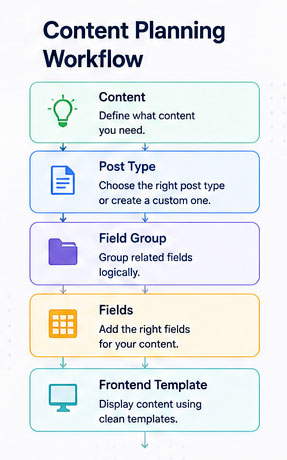
Before creating your first field, understand how your content will be organized.
Ask questions like:
- What content will repeat?
- Which pages need unique layouts?
- Will content be shared across pages?
- Can sections be reused?
Planning first prevents unnecessary field duplication later.
Proper planning is equally important when building larger digital platforms. The same structured approach used in ACF aligns with modern application architecture discussed in our guide on Building Enterprise SaaS Platforms, where reusable components and scalable data structures significantly reduce future development effort.
ACF Best Practices #2: Use Meaningful Field Names
Avoid names like:
❌ field1
❌ text_box
❌ data
Instead use:
✅ hero_title
✅ service_description
✅ testimonial_author
Meaningful names make development much easier when templates become larger.
ACF Best Practices #3: Organize Fields into Logical Groups
Instead of placing 40 fields together, separate them into sections.
Example:
Hero Section
- Heading
- Subheading
- CTA Text
- CTA URL
- Background Image
About Section
- Title
- Description
- Image
FAQ Section
- FAQ Repeater
Editors can immediately understand where each piece of content belongs.
ACF Best Practices #4: Choose the Right Field Type
ACF offers many field types for different purposes.
| Requirement | Recommended Field |
|---|---|
| Heading | Text |
| Description | Textarea |
| Rich Content | WYSIWYG |
| Button Link | Link |
| Image | Image |
| Gallery | Gallery |
| FAQ | Repeater |
| Team Members | Repeater |
| Features | Repeater |
| Categories | Taxonomy |
Choosing the correct field type improves both validation and usability.
ACF Best Practices #5: Avoid Deeply Nested Repeaters
Nested repeaters may seem convenient, but they can become difficult to maintain and may impact the editing experience.
Instead of:
Hero
→ Features
→ Feature Items
→ Icons
→ Descriptions
Consider simplifying the structure or using Flexible Content where appropriate.
ACF Best Practices #6: Reuse Field Groups
If multiple pages share similar content, don’t recreate the same fields repeatedly.
Examples:
- CTA Section
- Contact Information
- SEO Banner
- Newsletter Signup
Reusable field groups reduce maintenance and ensure consistency across the site.
ACF Best Practices #7: Use Flexible Content Wisely
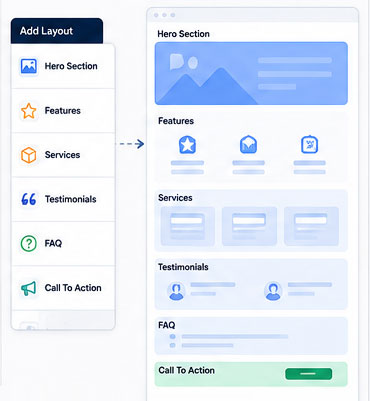
Flexible Content is one of ACF’s most powerful features, allowing editors to build pages from predefined layouts.
However, avoid creating dozens of layouts that overlap in functionality. Keep the selection focused on reusable sections such as Hero, Features, Testimonials, FAQs, and CTAs. This keeps the editing experience straightforward and reduces template complexity.
When implemented correctly, Flexible Content can serve as a lightweight page builder tailored specifically to your business requirements. If you’re planning a custom WordPress website with reusable content modules, our WordPress Development Services focus on building scalable, performance-driven solutions without unnecessary page builder overhead.
ACF Best Practices #8: Validate User Input
Use ACF validation features to improve content quality.
Examples:
- Required fields
- Character limits
- Minimum and maximum values
- URL validation
- Email validation
Validation reduces publishing errors and keeps content consistent.
ACF Best Practices #9: Keep Performance in Mind
Large websites may contain hundreds of custom fields. To maintain performance:
- Remove unused field groups.
- Load only the fields required for each template.
- Optimize uploaded images.
- Avoid unnecessary nested repeaters.
- Review field groups periodically and archive obsolete ones.
Good field management helps keep the WordPress admin responsive and easier to maintain.
The WordPress Developer Resources also recommend keeping themes and templates clean, avoiding unnecessary complexity, and following coding standards to improve maintainability and performance. Applying these principles alongside ACF helps create websites that remain efficient as content grows.
ACF Best Practices #10: Document Your Field Groups
As websites evolve, multiple developers may work on the same project.
Document:
- Field purposes
- Naming conventions
- Template locations
- Dependencies
- Reusable components
Documentation saves time during maintenance and onboarding.
Common Mistakes to Avoid
- Creating duplicate field groups
- Using vague field names
- Overusing Flexible Content
- Nesting repeaters excessively
- Forgetting validation rules
- Not planning content architecture
- Leaving unused fields in production
ACF Best Practices Checklist
| Best Practice | Recommended |
|---|---|
| Plan content structure | ✅ |
| Use descriptive field names | ✅ |
| Organize field groups | ✅ |
| Select appropriate field types | ✅ |
| Reuse field groups | ✅ |
| Keep layouts modular | ✅ |
| Validate inputs | ✅ |
| Optimize performance | ✅ |
| Document configurations | ✅ |
How Notebrains Helps You Build Better WordPress Websites
At Notebrains, we build custom WordPress solutions that prioritize long-term maintainability as much as design and functionality. By following proven ACF best practices, we create websites that are easier to manage, scalable for future growth, and optimized for performance.
Whether it’s a corporate website, enterprise portal, eCommerce store, or custom business application, our development approach focuses on clean architecture, reusable components, and an intuitive content management experience.
Whether you need a custom business website, an enterprise portal, or ongoing development support, our experienced Dedicated WordPress Developers can help you build secure, scalable, and easy-to-manage WordPress solutions using modern development practices and Advanced Custom Fields.
Frequently Asked Questions
Yes. ACF is widely used for enterprise projects because it enables structured content management while remaining flexible and scalable.
ACF itself is lightweight. Performance issues usually arise from poor implementation, excessive field complexity, or unoptimized templates.
Use Repeaters for repeating data with the same structure, such as FAQs or team members. Use Flexible Content when editors need to arrange different predefined content sections to build unique page layouts.
For many custom development projects, yes. ACF combined with custom templates offers greater flexibility, cleaner code, and improved performance compared to relying solely on page builders.
Conclusion
Advanced Custom Fields is much more than a plugin for adding extra fields, it’s a foundation for building structured, scalable WordPress websites. By planning your content architecture, using descriptive field names, organizing reusable field groups, and keeping performance in mind, you can create websites that are easier to manage for both developers and content editors.
Whether you’re building a marketing website, a business portal, or an Enterprise WordPress solution, following these ACF best practices will help you create cleaner code, improve content management, and simplify future maintenance. And if you’re looking for expert assistance, our team of Dedicated WordPress Developers can help you build custom WordPress solutions that are designed for performance, scalability, and long-term growth.